Design Your Rhythm.
Your Mac Keeps It.
Rhythms closes the sites and apps that pull you away, at the hours you choose. No snooze button. No browser extensions. No Quit.
Pulls You Away
 Instagram✕
 TikTok✕
 YouTube✕
 Reddit✕
 X (Twitter)✕
 Netflix✕
 Facebook✕
 Amazon✕
 Temu✕
Temu✕ CNN✕
CNN✕ The New York Times✕
 Slack✕
 Messages✕
 WhatsApp✕
 Discord✕
 Twitch✕
When The Option Isn't There, You Stop Negotiating With Yourself.
Every feed, badge and autoplay on your screen was put there by someone paid to take your attention. Fighting that every evening, in the moment, is a fight you were never meant to win.
Rhythms moves the decision to a calm moment. You choose once which sites and apps close, and when. After that, your Mac holds the line, even on the days you don't.
Not An Error. A Pause.
Open a closed site and the tab turns into this, within a second, in every browser you use. Tabs you left open from before turn calm too.

Set It Up Once. Then It Runs On Its Own.
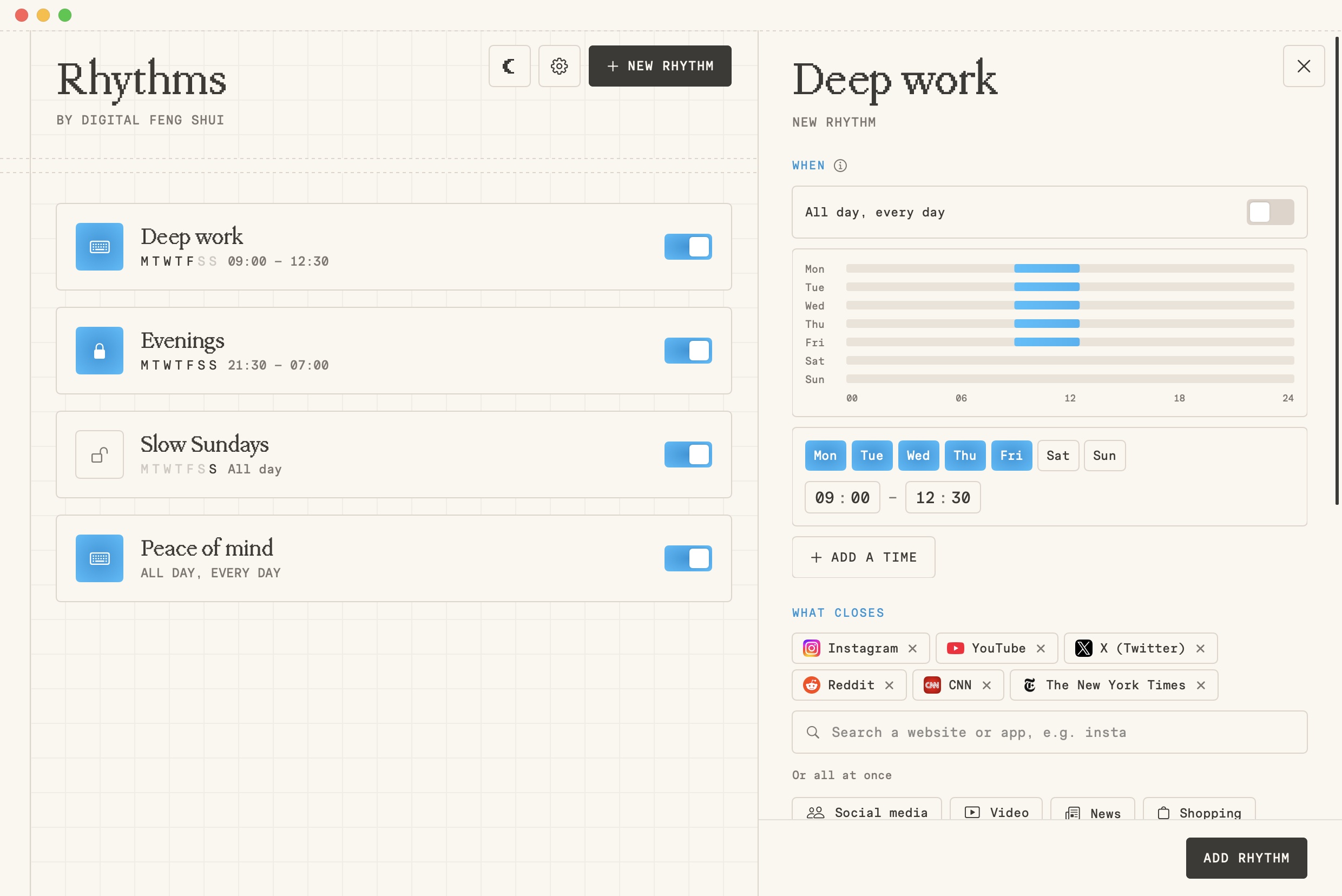
When
Pick the days and the hours. Overnight works, and one rhythm can hold several times. Or tick all day, every day.
What Closes
Type “insta” and Instagram is there. Apps sit in the same list as sites, or close a whole group at once.
How Firm
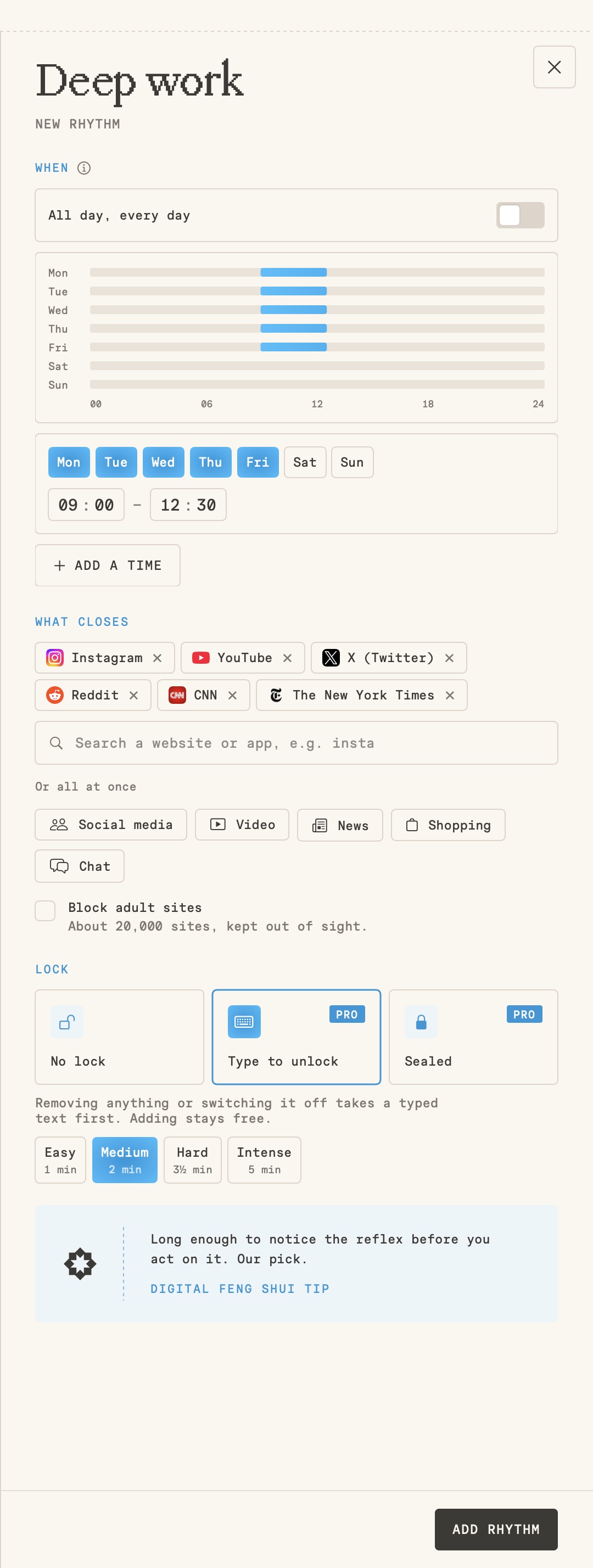
No lock for a nudge. Type to unlock when changing your mind should cost a minute. Sealed when nothing should move.
Changing Your Mind Costs A Paragraph.
Lock a rhythm, and loosening it takes a typed text first. No pasting, and a new text every time, written to make you think twice. Halfway through, you might not want to anymore. Adding to a rhythm always stays free.
The Browser Add-On Is Gone.
No Snooze. Ever.
There's no “five more minutes”. A block ends when you said it would, not when the urge says so.
Snooze 5 minNo Quit Button
⌘Q only closes the window. Rhythms keeps running in the menu bar, and with Stays on, even a force quit brings it straight back.
Every Browser, No Extensions
Sites close on your Mac itself, not in a browser add-on you can switch off in two clicks.
Apps Too
Slack after work, Messages during deep work. A closed app quits, and a small note tells you why.
Adult Sites, One Tick
One box closes about 20,000 adult sites. You never see the list.
Stays On Your Mac
No account and no tracking. Your rhythms are saved on your Mac, not in a cloud.
Easy To Set Up. Hard To Get Around.
Most blockers pick one. The easy ones bend the moment you push back. The firm ones are fiddly to set up and lean on browser extensions. We wanted both, so we built it.
 ScreenZen
 Cold Turkey
 Opal
Opal Rhythms
What Early Users Say
Placeholder section with stand-in text. Hide it until real reviews come in.
The calm page is the part I didn't expect to like. I open Instagram on autopilot, get “Not now.”, and catch myself smiling.
I've tried every blocker with a snooze button. I snoozed all of them. Rhythms just doesn't give me the option, and that turns out to be the whole point.
Set it up in five minutes on a Sunday. My weekday mornings have been mine ever since.
Type to unlock is evil in the best way. Halfway through the paragraph I usually remember why I set it.
No browser extensions was the selling point for me. I switch between Arc and Safari all day and it just holds.
Evenings closes YouTube and Netflix at 21:30. I'm reading again. Actual books.
It doesn't feel like a punishment tool. It feels like a calm agreement with myself.
Sealed for my deep work block. I can't negotiate, so I don't. Best two hours of my day.
My partner and I both run an Evenings rhythm now. The couch is a lot quieter.
It closes apps too, with a little note that says why. Even Mail rests on Sundays now.
I set the hours once and forgot about it. That's exactly what I wanted from a blocker.
The menu bar icon is so quiet I forget it's there, until I need it to be.
Other blockers felt like a fortress. This feels like a nice room with the door closed.
Within a week I stopped reaching for my phone the moment I sat down. Small change, big difference.
Finally a Mac app that looks like it belongs on my Mac. Simple, calm, and it does one thing well.
Start Free. Add The Locks When You're Ready.
Begin with a rhythm you can switch off. Make it firmer once you know what you need.
FAQ
Which Macs does it run on?
Macs with Apple silicon (M1 and newer), on macOS 14 Sonoma or later.
Does it work in my browser?
Sites are closed in every browser, because Rhythms blocks them on your Mac itself. In Safari, Chrome, Arc, Dia, Brave, Edge, Opera and Vivaldi the tab also turns into the calm page. In other browsers, like Firefox, the site won't load and a small note tells you why.
What if I really need a blocked site?
That depends on the lock you chose. With No lock, you switch the rhythm off. With Type to unlock, you type the text first. Sealed stays shut until the rhythm ends.
Can't I just quit the app?
No. There's no Quit in the menu bar, the Dock or under ⌘Q. Rhythms only closes when you log out, restart or shut down, and with Stays on it comes back after a force quit too.
Why does it ask for my password once?
To set up website blocking. Closing sites on your Mac itself, instead of in a browser extension, needs your Mac's permission. You give it once.
Do I need an account?
No. There's no account and no login. Your rhythms are saved on your Mac.
Is it in the App Store?
No. You download it directly from Digital Feng Shui.
Is there an iPhone version?
Not yet. We're starting with the Mac.
Design It Once.
Let It Run.
Rhythms is in early access, free, with every Pro lock included. Leave your email and we'll send you the download for your Mac.